How to make a real estate video
The quickest real estate video is built from the listing photos you already have: 6 to 10 photos, exterior first, the address and price on screen, one short caption per room, music, exported vertical (9:16) for Reels, TikTok and Shorts. If you want motion through the rooms, film a slow walkthrough on your phone in the order a buyer would walk the house. Keep social cuts to 15 to 45 seconds.
Four ways to make one
| Method | Your time | Best for |
|---|---|---|
| Listing photos to video | 5 to 20 minutes | Every listing, the day photos come back |
| Film it on an iPhone | 1 to 3 hours with editing | Walkthroughs, agent-on-camera tours |
| Edit in Canva | 30 to 60 minutes | Agents who already use Canva templates |
| Hire a videographer | Scheduling only | Luxury listings, drone, cinematic tours. See what they charge |
Step by step: a listing video from photos
- Pick 6 to 10 photos. Front exterior, entry or living room, kitchen, primary bedroom, primary bath, the best feature (view, yard, pool), rear exterior. Skip the second and third bedrooms unless they sell the home.
- Order them like a showing. Curb, front door, main living space, kitchen, bedrooms, outdoor space. Buyers follow a walk better than a random set.
- Put the facts on the first frame. Address, price, beds and baths. People scroll past fast; the first two seconds should say what and where.
- One caption per photo, four words or fewer. "Updated kitchen", "Half-acre lot", "Primary suite with walk-in". Name the feature, skip adjectives like stunning.
- Hold each photo 2 to 3 seconds with a slow push in or pan. Faster than 2 seconds and nobody can read the caption.
- Add music you are allowed to use. See music for real estate reels.
- End on your name and contact, or the listing link.
- Export 1080 x 1920 (9:16) for Reels, TikTok, Shorts and Facebook Reels. Export 1920 x 1080 (16:9) separately if you also post to YouTube or your website.

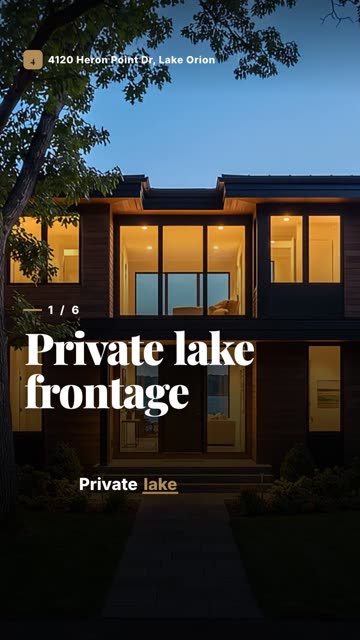
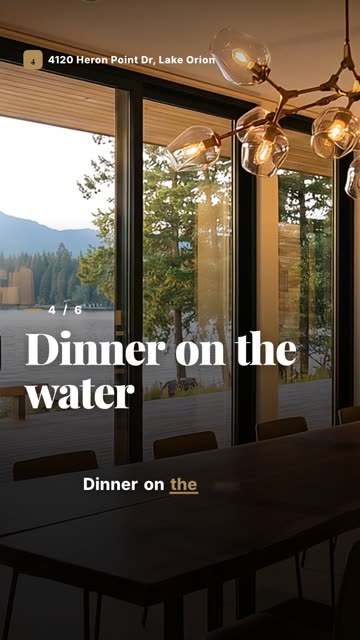
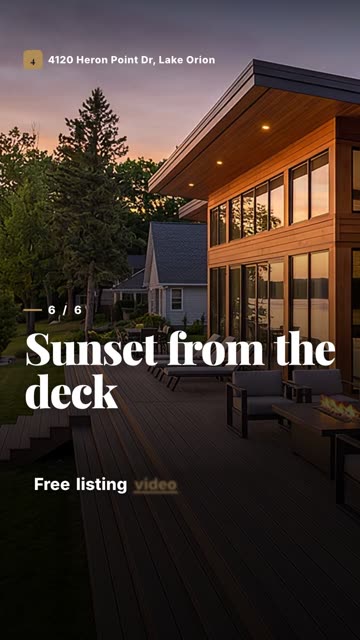
Length and format by platform
| Where | Shape | Length that works for a listing |
|---|---|---|
| Instagram Reels | 9:16 vertical | 15 to 45 seconds |
| TikTok | 9:16 vertical | 15 to 60 seconds |
| YouTube Shorts | 9:16 vertical | 15 to 60 seconds |
| 9:16 for Reels, 1:1 or 4:5 in the feed | 15 to 60 seconds | |
| YouTube, website, MLS tour link | 16:9 horizontal | 1 to 3 minutes |
Instagram Reels and YouTube Shorts both accept up to three minutes as of 2025, and TikTok accepts much longer uploads. The ranges above are what holds attention for a single listing, well inside those limits.
Filming instead of photos
Filmed video shows flow between rooms, which photos can't. It also takes longer: plan an hour on site and an hour or two to edit. The short version:
- Turn on every light, open every blind, and shoot mid-morning or early afternoon.
- Lock the exposure on the brightest room you will walk into so the windows don't flash white.
- Walk slowly at chest height and keep the phone level. Short 5 to 8 second clips edit far better than one long take.
- Film the route a buyer would walk. The walkthrough guide has a room order and pacing.
Full settings and a shot list: how to film a real estate video with an iPhone. For aerials, read the drone guide first, since paid drone work needs an FAA certificate.
With AI
An AI listing video maker takes over the slow parts: pulling the facts and photos off the listing, laying out the title card, moving each photo, timing the cuts to music and exporting. The Reelhouse listing video maker is free. Paste a link from your brokerage or agent site (Zillow, Realtor.com and Redfin block automated readers, so upload photos for those), tap 3 to 8 photos in the order they should play, add a short caption for each if you like, and check the address and price before you make it.
What to post it with
- A first line with the town and one hook: "Lake Orion, private frontage, $1.85M."
- Beds, baths, square footage and the open house time if there is one.
- Location tags and three to five local hashtags. See TikTok ideas and Instagram post ideas.
- Fair-housing-safe wording: describe the property, not the kind of buyer you want.
Questions
What is the fastest way to make a real estate video?
Build it from the listing photos you already have. A photo-based listing video needs no filming: pick 6 to 10 photos, put the exterior first, add the address and price, and export at 9:16. The free Reelhouse listing video maker does this from a listing link or uploaded photos in about three minutes.
How long should a real estate listing video be?
For Instagram Reels, TikTok and YouTube Shorts, 15 to 45 seconds is the useful range for a listing. A full walkthrough for YouTube, your website or the MLS virtual tour field can run 1 to 3 minutes.
Can I make a real estate video with just my phone?
Yes. Any recent iPhone or Android phone shoots 4K, which is more than Reels or TikTok will show. Shoot horizontal for YouTube and the MLS, vertical for Reels and TikTok, and move slowly. The iPhone guide on this site has settings and a shot list.
Do I need music in a listing video?
Most social listing videos use music, because many people watch with sound on and a silent video feels unfinished. Use music you have the right to use on a business account. The music guide explains what each platform allows.
Can AI make a real estate video from photos?
Yes. The free Reelhouse listing video maker reads the address, price and photos from your listing link. You tap the photos in the order they should play and add an optional caption for each, and it builds the title card, motion, music and a vertical 9:16 video. Check the address and price before you make it.
Have the photos already?
Turn them into a listing video now. Free, about three minutes.